
Data Transfer Instructions
INSTRUCTIONS FOR TRANSFER OF DATA FROM
URINE ANALYZER TO HOST COMPUTER
(FOR WINDOWS 7, VISTA AND XP)
- Obtain a USB to RS232 Serial DB9 “Male" Cable Adapter
- Attach the 9-pin end of RS232 cable to back of Analyzer and the other USB end to the Computer.
- Set up Analyzer Settings:
- Go to Home Menu
- Touch “Setting"
- Touch “Set Comm."
- Baud Rate: 115200
- Data Bits: 8
- Parity: None
- Stop Bits: 1
- Data Format: OPTIMA
- Touch “Save"
- Download Termite. Go to www.compuphase.com/software_termite.htm
- Download the latest version of Termite – complete setup and installation. Save to desktop.
- Open Termite
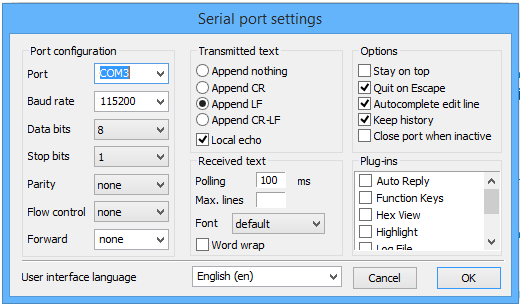
- Click on “Settings." See Serial Port Settings on the next page.
- Connect Port Using: COM 1, COM 2, COM 3, COM 4 or COM 5 (depends on configuration of computer)
- Baud Rate, Data Bits, Stop Bits, Parity should be set to the same values as the Analyzer Settings
- When the settings are set, Termite should look like this. The COM 3 in the picture might be different than yours depending on the configuration of your computer.
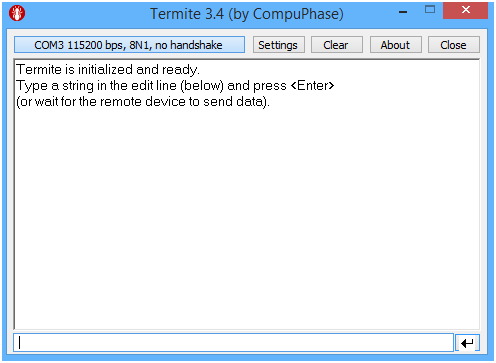
- You should be connected now. Run Measure on analyzer as usual. Results will be shown on the computer screen. You can copy and paste or configure the data on the screen into desired EMR applications.